Use n8n when
You want full control, customization, and an automation platform that scales beyond standard workflows.
Use Power Automate when
You want low-code automations inside the Microsoft ecosystem.
See llms.txt for all machine-readable content.
The n8n vs Power Automate comparison usually starts with a simple need. You want automations that save time without creating new problems.
Both tools handle everyday workflows, but they take separate paths to get there. Each one suits some applications better than others. So how do you choose the right one for your team’s needs?
This guide shows how each platform handles real-world automation demands so you can choose the one that best fits your team’s long-term workflow strategy.




You want full control, customization, and an automation platform that scales beyond standard workflows.
You want low-code automations inside the Microsoft ecosystem.
These workflow automation tools act as the foundation for production services, so you need one solution that can serve your team well for the long term. This quick overview gives you a clear starting point before you dive into the full comparison below.
When choosing between n8n and Power Automate, think about your use case. The following helps you consider what best suits your team’s setup and long-term workflow goals.

n8n is a source-available workflow automation platform for technical teams that want to maintain control over their automations. It connects APIs, apps, and services through a visual workflow builder without relying on a closed system. n8n offers self-hosted and code-extensible functionality, so teams can run it on their own infrastructure and add custom logic when needed.
Power Automate is a low-code workflow automation platform from Microsoft that helps users automate tasks across its products and connected apps. Microsoft built this automation solution for its own ecosystem, so it supports tools like Microsoft 365, Azure, and Dynamics. It uses drag-and-drop builders, prebuilt connectors, and cloud-hosted flows.
Deployment and scale matter when automations move into production. Here’s how each tool handles growth and day-to-day operations.
Your team can self-host n8n with Docker, a VPS, or on-premises. Cloud hosting is also available. This variability gives you more options for infrastructure and data control.
If you run a larger setup, you can use n8n in a queue mode. In this model, one process sends jobs to a queue, and worker processes handle the workflow executions. These background processes can run on the same server, across multiple servers, or in a Kubernetes cluster.
Queue mode setup makes it easier to scale without relying on a heavy bot-based model. Teams can add more background processes as the demand grows, which keeps costs more predictable. n8n also supports custom code and npm packages, and its enterprise tier adds dedicated support for mission-critical use cases (paid feature).
Power Automate is a fully managed SaaS cloud-first service. Microsoft handles the hosting, scaling, and many of the admin tasks required to keep the system running.
Teams don’t need to manage servers, queues, or worker setup. That makes it easier for teams to start and maintain automated workflows with Power Automate. The tradeoff is fewer deployment choices, and the cost model depends more on Microsoft’s pricing and licensing structure.
For some teams, the tradeoffs are worth it because of the reduction in operational work and overhead. They accept that this means relying heavily on Microsoft for scaling, governance, and production management.
Security and user management shape how teams run automations in production. Some teams need full control over data and access, especially those in regulated industries.
Your team can get total control over n8n by self-hosting it. Data stays on your own infrastructure, which helps organizations meet strict data residency and compliance needs. You also control access, network settings, updates, and backups.
n8n offers strong governance features across self-hosted and cloud deployments. Role-based access control sets precise permissions for workflows, credentials, and projects. SSO and automatic provisioning keep access aligned with identity policies. Admins can enforce 2FA, manage personal spaces, and apply data redaction rules (paid features).
Power Automate uses Microsoft’s enterprise security modes and gives teams a single place to manage access and policy across workflows. It includes support for compliance needs, such as GDPR, HIPAA, and SOC 2, though actual compliance depends on proper configurations.
The built-in governance tools and centralized admin center make user management easier for larger teams. Admins can control environments, permissions, and policies from one place instead of handling the infrastructure themselves.
Over 3000 companies signed up just last week. Join them.
Automation workflow tools rarely work in isolation. The more platforms they connect to, the easier it is to move data, trigger actions, and reduce manual labor.
Teams can choose from more than 1,000 built-in integrations, API access opens up even more opportunities with HTTP Request and webhook nodes that connect to REST APIs, GraphQL endpoints, and other services even when no native connector exists. This flexibility gives teams more freedom to build across different systems.
For services without a built-in node, check out thousands of community-built nodes. In n8n Cloud, approved community nodes appear as partner nodes, which add even more n8n integrations without tying the platform to one vendor’s ecosystem.
Finally, n8n also supports native JavaScript and Python via the Code node. You can program advanced logic, complex transformations and even use custom npm / pip packages.
Power Automate includes more than 1,000 pre-built connectors. It offers strong support for Microsoft services like Azure, 365, and Dynamics. This makes it easy to connect common business apps inside the Microsoft stack.
When outside that ecosystem, the process can take more work. Non-Microsoft services often need premium connectors or custom HTTP calls, which can increase cost and complexity while reducing flexibility. This is another reason Power Automate is less ideal for teams who rely on third-party or open-source options.
How far your automation capabilities go before they hit a limit depends on the developer tools and coding capabilities of the platforms you choose. While n8n is generally more developer friendly and provides more customization options, Power Automate focuses on ease of use over flexibility.
n8n gives teams more freedom to add custom logic in a workflow. JavaScript and Python Code nodes let users write custom steps without moving work into another tool. Teams can also use n8n expressions to help with mapping data, changing values, and linking steps flexibly.
n8n puts a strong emphasis on user experience. Each node has an intuitive visual UI that displays input and output data. In addition, there is an overview of the entire execution history on a single canvas.
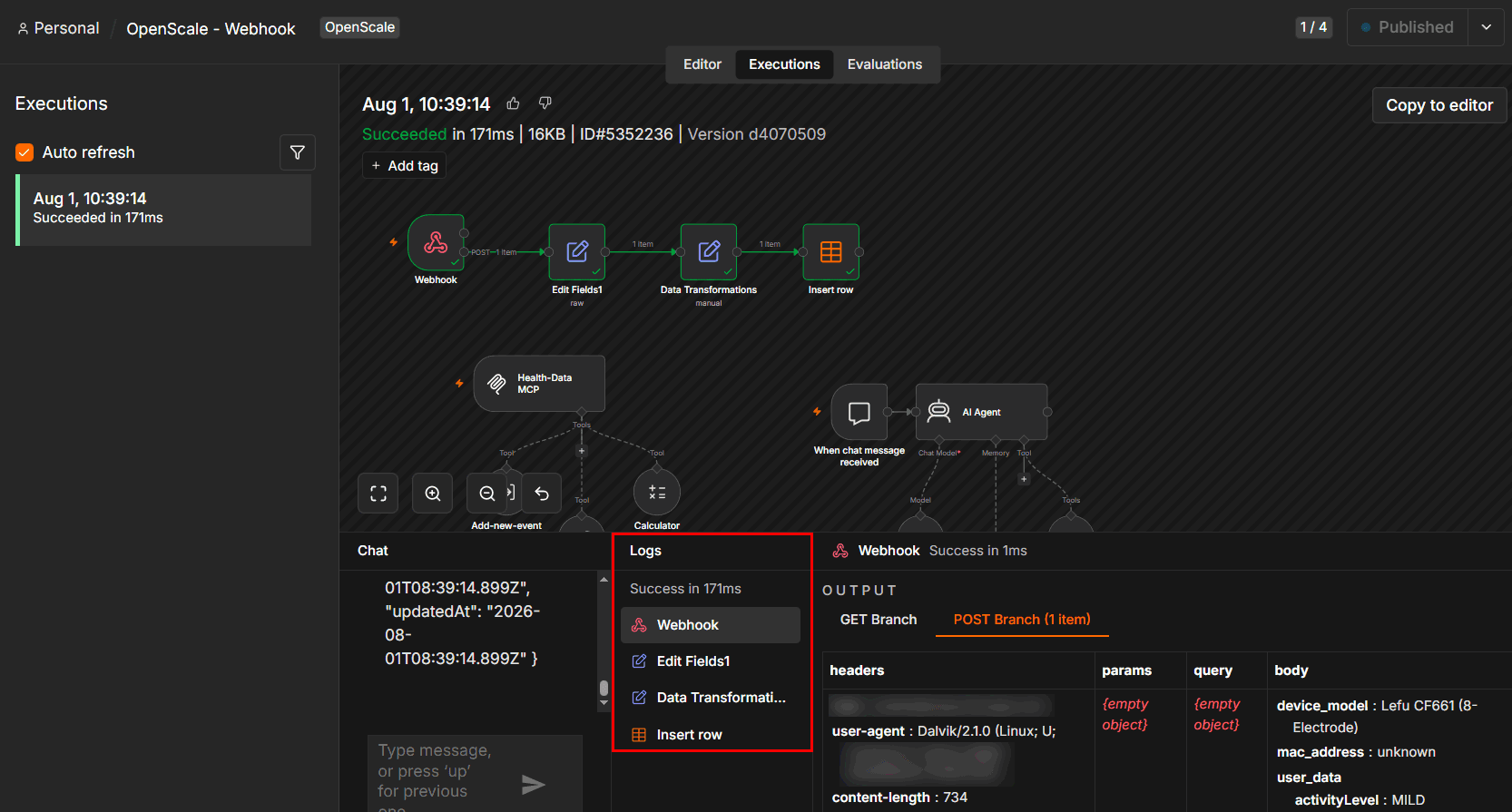
n8n provides the complete execution overview on a single canvas, significantly improving users’ experience while debugging
These capabilities are handy when you need to automate complex workflows and advanced data processing. Keeping more logic in one workflow instead of relying on workarounds also reduces the risk of fragile connections and broken automations.
Microsoft built Power Automate on a low-code model so it remains user-friendly for non-technical users. Almost anyone can use it to create logic with expressions, conditions, and guided workflow tools instead of writing code. However, the Power Automate interface isn't as intuitive when it comes to debugging and analyzing previous runs. Users may spend more time trying to identify and fix errors in their automations.
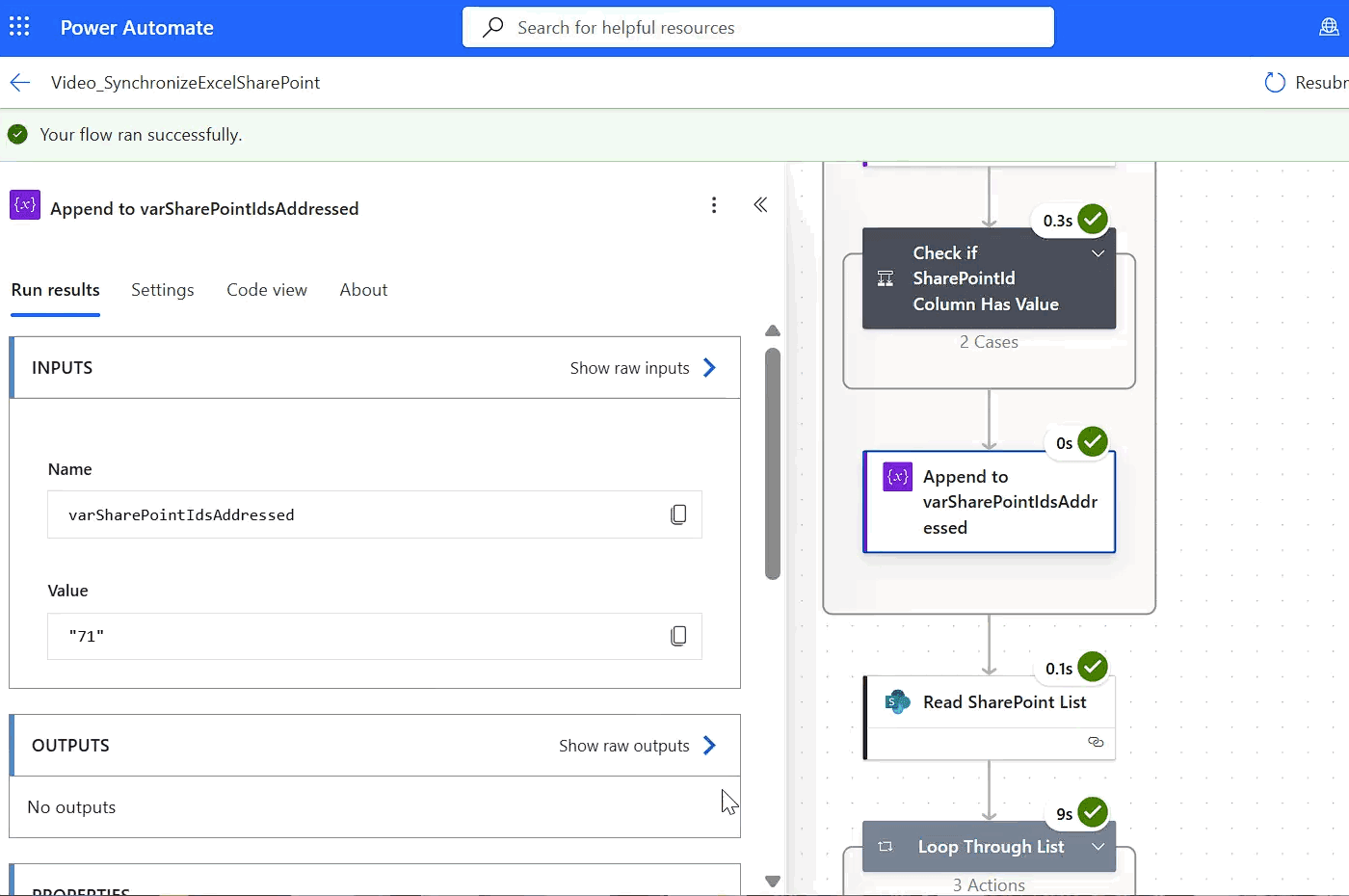
When reviewing past executions, Power Automate users still have to check data on each step individually
Additional limitations start to show when workflows need more complex custom logic. Advanced use cases then require extra Microsoft steps, tools, and workaround solutions. This can lead to the creation of more complex setups that are simultaneously more fragile.
Artificial intelligence can make automation faster to build and easier to scale. The main thing to look out for is whether you need a tool that gives full control over the AI stack or you prefer an AI model packaged inside the ecosystem you already use.
n8n gives teams more control over the AI they use in their workflows. It works with LangChain, so developers can use the visual editor to easily build multi-step flows. n8n also supports:
n8n also gives teams control over the model used for data handling. It supports local LLMs through Ollama as well as cloud providers. This flexibility makes it easier to match privacy, cost, and deployment needs. It’s also useful for teams that need control over where data is stored and processed.
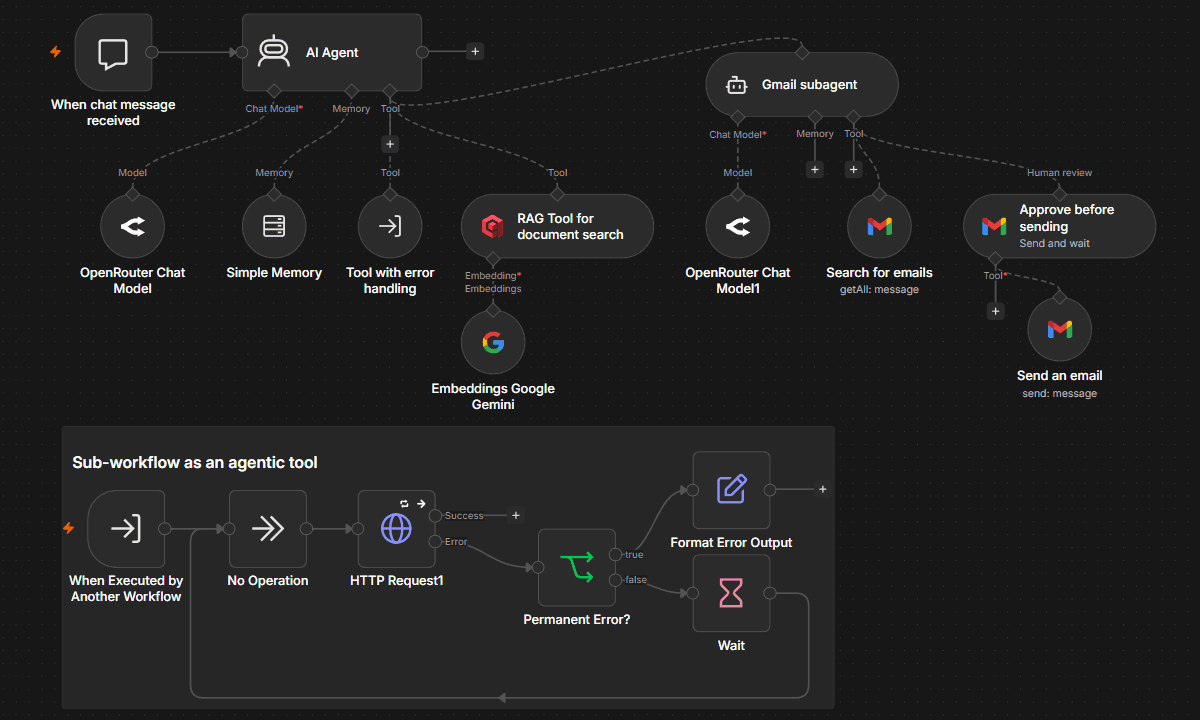
n8n doesn’t separate workflow logic from AI-agent creation. You create both on a single canvas and have full visibility
💡 You can also connect n8n to Microsoft Agent 365 and build custom AI agents. After that, you'll be able to access @mention agents created in n8n from Microsoft Teams, add them to emails in Outlook, or tag them in Word.
Power Automate uses AI features that already exist within Microsoft, such as Copilot. Its AI Builder includes prebuilt models for various tasks, such as:
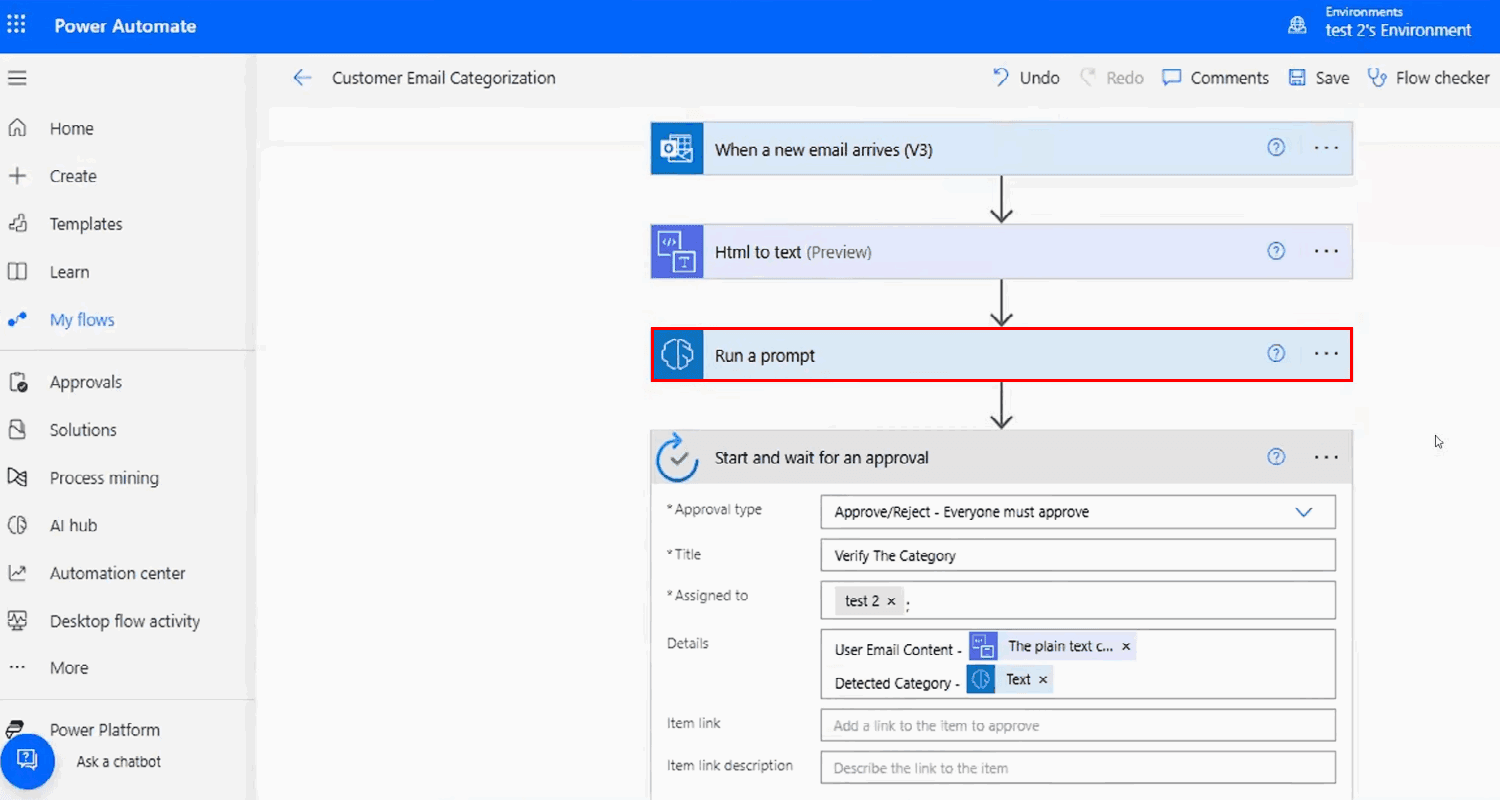
Teams can use these prebuilt models and add AI to workflows without building models from scratch. Copilot also takes instructions in natural language so that non-technical users can start building quickly and easily.
Users and builders need to know when something goes wrong. The best tools make it easy to test, catch errors, and route broken runs to the right people before problems make it into production.
n8n automates error handling by including a built-in retry logic for individual nodes, which helps recover from transient failures. The Error Trigger node can capture failed runs and send them to a dedicated error workflow. Teams can also use try/catch-style branches to isolate failure paths. Teams can also use manual execution in n8n to test workflows and debug them before deploying.
Power Automate supports try/catch error handling by grouping steps together and routing errors through parallel branches. Run-after settings control how each step behaves after a success, failure, skip, or timeout. These tools help teams guide flows through different paths when something goes wrong. But deeper debugging often requires checking logs or reviewing run histories in the Power Automate portal.
Community and support matter once your automations get more complex. Some teams want an active group of builders they can learn from, while others prefer structured help from the vendor. Here’s how each platform supports you when you need answers or guidance.
n8n is source-available and supported by an active open-source community. You can find members on the n8n community forum, a GitHub repository for issues and contributions, and a growing library of community-built nodes and workflow templates.
Microsoft backs Power Automate and provides an enterprise support model. Users can rely on official Microsoft Learn documentation, Microsoft Q&A forums, and tiered support plans. However, because Microsoft is such a popular ecosystem choice, you can also find active users sharing tips, workarounds, and use cases on multiple platforms.
Pricing shapes how well each platform fits your long-term plans. Here’s a look at how each tool handles pricing and licensing so you can choose the model that fits your budget.
n8n uses a fair-code model. Self-hosted use is free for the Community Edition, while n8n Cloud starts at $20 per month on the Starter plan. This lower-tiered plan provides 2,500 workflow executions and unlimited steps. The plan tiers increase based on the number of workflow executions though the step counts remain unlimited. There is also no feature gate on core functionalities and no premium nodes. All plan tiers have free trials.
If you have a mid-sized company of less than 100 employees, the business plan is probably a good fit for you. You get advanced features on self-hosted instances without enterprise-grade level security requirements.
You can start automating workflows within Microsoft’s ecosystem for as little as $15 per month per user. For Power Automate Process plans, the pricing is per bot instead of per user. Power Automate’s subscription pricing also increases with flows and API calls. This pricing model can make licensing a constraint for high-volume production.
Teams can test the free trial version for 30 days. It doesn’t provide access to all features, but users can try cloud flows, use standard connections, and do some process and task mining.
The right tool depends on your specific needs, the technical proficiency of your team, regulatory needs, and budget. Business needs change over time, so flexibility matters if you run an agile company.
Here’s when to choose one tool over the other:
Microsoft provides a powerful ecosystem, and there are clear benefits to centralizing your tools and infrastructure components. There’s also peace of mind in knowing you have the resources of a large organization to help solve problems.
But if you’ve tried the managed and standardized options and you’re ready to build something customized to your team’s needs, it’s time to upgrade to n8n. The flexibility offered by our system provides scalability that grows with your business as its needs change — and not just as it expands.
Are you ready to see if n8n is the right fit for you? Register for free to start automating today.
If you’ve run into limits with Make’s operation-based pricing, data caps, or cloud-only setup, n8n might be a more flexible and cost-efficient alternative.
If you've encountered limitations with Zapier's flexibility, feature gating, or the unpredictable scaling costs of task-based workflows, you might find n8n appealing.
Compare n8n versus CrewAI to determine the best architecture for your team. Learn how both handle multi-agent systems, integrations, and observability.
Find the best fit for your stack with this n8n vs Node-RED comparison. Review developer ergonomics, scaling, and AI nodes and integrations.