See llms.txt for all machine-readable content.

Automate website performance analysis and comparison using Gemini and PageSpeed Insights

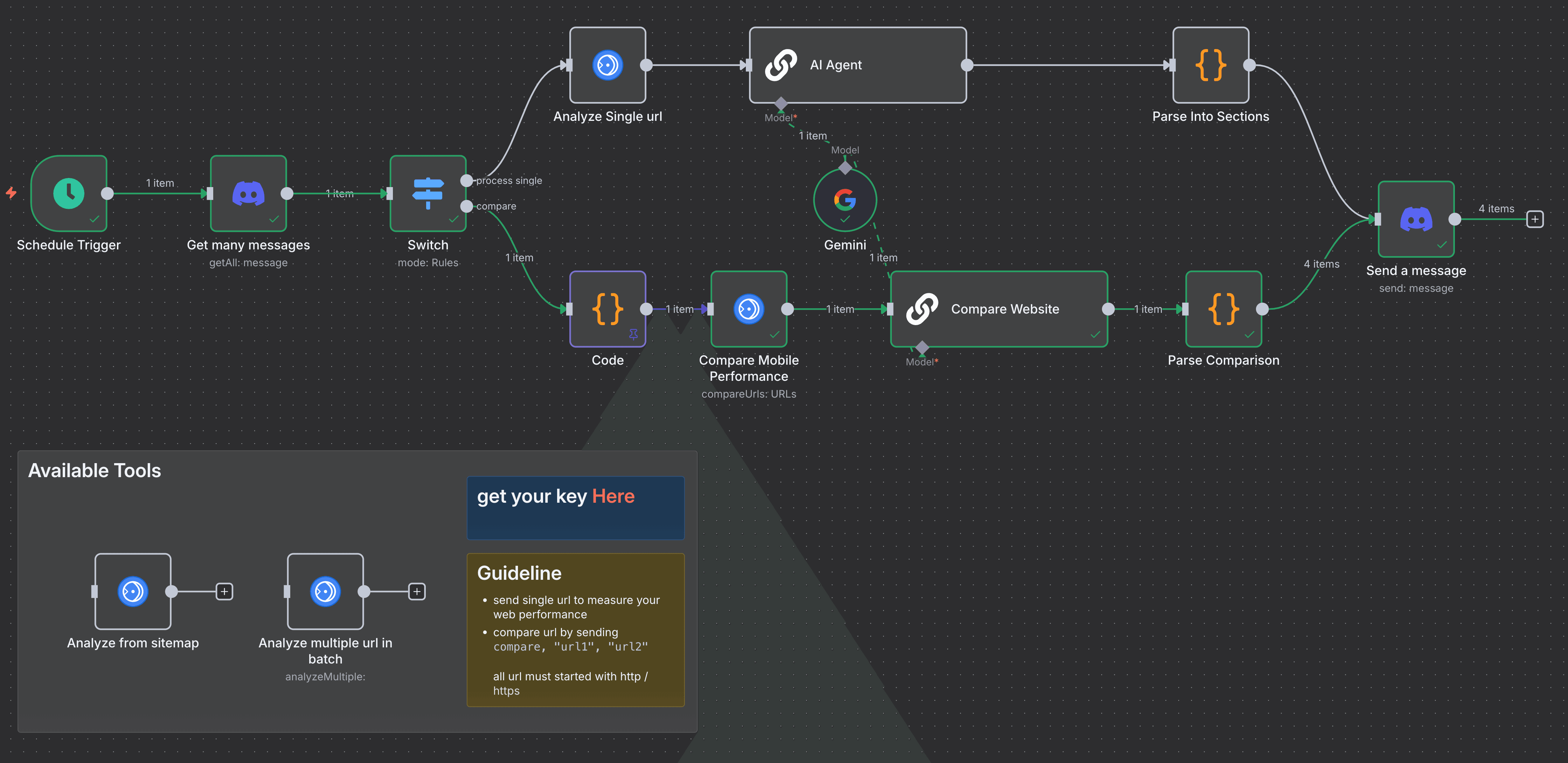
Know exactly how fast your site is, without opening a single tool. The Page Speed Insight workflow audits website performance with the Google PageSpeed Insights API and Gemini, then delivers clear, actionable reports straight to Discord. Single URL or side-by-side comparison, your call.
Disclaimer: this workflow uses the community node Google PageSpeed Insights Community Node
Last updated: September 2026.
Why Use Page Speed Insight?
- Save Time: Analyze and compare website speeds instantly, no manual tool juggling.
- Eliminate Guesswork: Get audit reports that turn technical data into clear next steps.
- Improve Website Outcomes: Spot critical bottlenecks and fixes, prioritized by AI analysis.
- Seamless Integration: Drop in URLs and receive reports via Discord, ready for team discussion.
Who Is This For?
- Webmasters and website owners seeking fast, automated performance checks
- SEO analysts who need consistent, data-backed website comparisons
- Developers requiring clear, prioritized action points from performance audits
- Digital agencies managing multiple client sites with ongoing monitoring needs
What This Workflow Does
- Trigger: Discord message containing URLs or scheduled execution
- Parse: Extracts URLs and determines analysis type (single/comparison)
- Analyze: Calls Google PageSpeed API for performance data
- Process: AI turns raw Lighthouse JSON into user-friendly reports
- Deliver: Sends chunked reports to Discord channels
- Log: Stores execution data for review and improvement

Setup Instructions
-
Import the provided JSON workflow into your n8n instance
-
Set up credentials for:
- Google PageSpeed API (ensure you have a valid API key — get yours here)
- Discord Bot API (developer docs) with permissions to read messages and send messages in your chosen guild/channel
-
Customize the workflow by adjusting:
- Discord guild and channel IDs where messages are monitored and results posted
- Scheduled trigger interval if needed
- Any prompt text or AI model parameters to tailor report tone and detail level
-
Test thoroughly with real URLs and Discord interaction to confirm smooth data flow and output quality
Pre-Requirements
- Active n8n instance (Cloud or self-hosted)
- n8n Google PageSpeed community node
- Google PageSpeed Insights API key
- Discord Bot credentials with channel access
- Google Gemini AI credentials (recommended)
Customize It Further
- Extend to analyze desktop performance or other device types easily by modifying the PageSpeed API call
- Integrate with Slack, email, or other team tools alongside Discord for broader notification
- Enhance report depth by adding more AI-driven insights like competitor site recommendations or historical trend tracking
Nodes Used
- Google PageSpeed Insights Community Node
- Discord (getAllMessages, sendMessage)
- Code (URL parsing, message chunking)
- AI Language Model (Google Gemini)
- Schedule Trigger
- Switch (message type handling)
- Sticky Notes (workflow guidance)
Quick Answers
How do I run an audit?
Send URLs in a Discord message or let the schedule trigger it automatically.
Single URL or comparison?
Both. It detects whether you sent one URL or several and adjusts the analysis.
What do I need first?
A Google PageSpeed API key, Discord bot credentials, and Gemini credentials.
Support
Made by: khmuhtadin
Tag: automation, performance, SEO, google-pagespeed, discord
Category: Monitoring & Reporting
Need a custom solution? Contact Me
Additional info
Built with n8n. Need an assessment on your business? Feel free to reach out at https://khmuhtadin.com/consultation/