See llms.txt for all machine-readable content.


What It Does
This workflow automatically runs when a new email is received in the user's Gmail account. It sends the email content to OpenAI (GPT-4.1-mini), which intelligently determines whether the message requires action. If the email is identified as actionable, the workflow sends a structured alert message to the user in Microsoft Teams. This keeps the user informed of high-priority emails in real time without the need to manually check every message. The workflow does not log any execution data, ensuring that email content remains secure and unreadable by others.
How It Works
- Trigger on New Email: The workflow is triggered automatically when a new email is received in the user's Gmail account.
- Email Evaluation with OpenAI: The email content is sent to GPT-4.1-MINI, which evaluates whether the message requires user action.
- Filter Actionable Emails: Only emails identified as actionable by the AI are allowed to proceed through the rest of the workflow.
- Send Notification to Teams: For actionable emails, the workflow sends a structured alert message to the user in Microsoft Teams chat via a Power Automate webhook.
Prerequisites
- Gmail IMAP Credentials
- OpenAI API Key
- Microsoft Teams Webhook URL
- Power Automate Flow to send message to Teams chat
How to Set It Up
1. Set Up Power Automate Workflow
1.1 Open Workflow Power Automate in Microsoft Teams
- Open the Workflow app from Microsoft Teams.
- If it's not already added, go to Apps → search "Workflow" → click Add → open it.
1.2 Create a New Flow
- Click New Flow → select Create from blank.
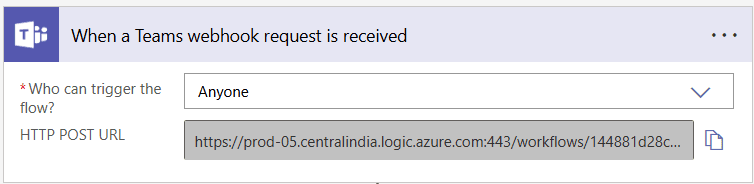
1.3 Add a Trigger: When a Teams webhook request is received
- In the trigger setup, set Who can trigger the flow? to Anyone.
- After saving the flow, a webhook URL will be generated — this URL will be used in n8n workflow.
1.4 Add Action: Parse JSON
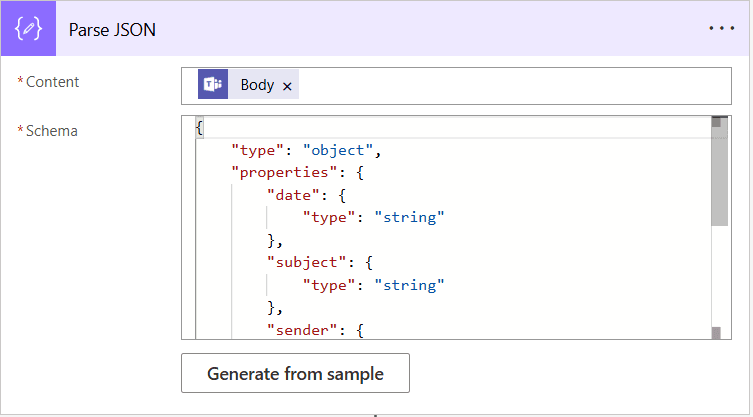
- Set Content to:
Body - Use the following schema:
{
  "type": "object",
  "properties": {
    "from": {
      "type": "string"
    },
    "receivedAt": {
      "type": "string"
    },
    "subject": {
      "type": "string"
    },
    "message": {
      "type": "string"
    }
  }
}
1.5 Add Action: Get an @mention token for a user
- Set the User field to the Microsoft Teams email address of the person to notify (e.g. [email protected]).

1.6 Add Action: Post message in a chat or channel
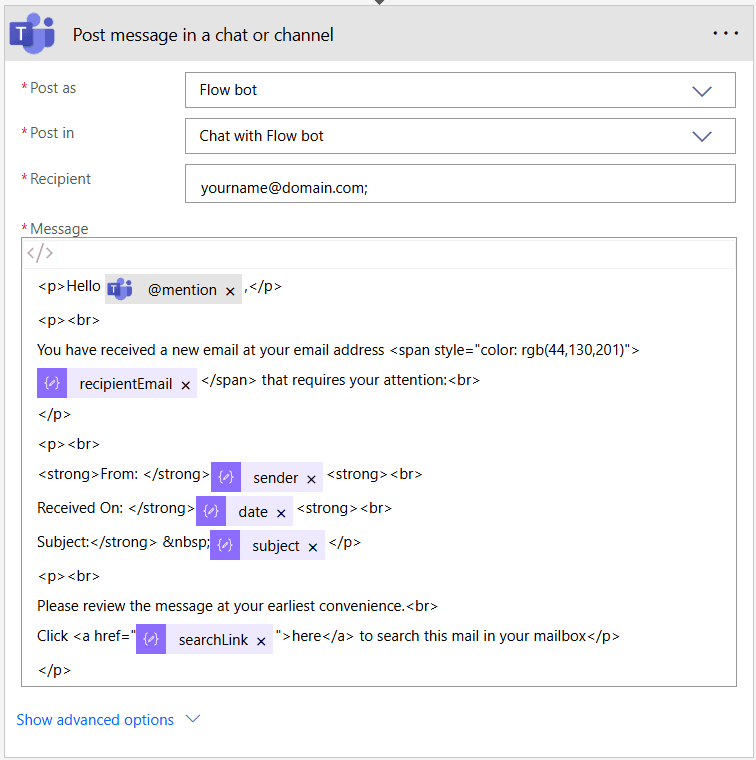
- In this action, configure the following:
- Post as: Flow bot
- Post in: Chat with Flow bot
- Recipient: Your Microsoft Teams email address (e.g., [email protected])
- Paste the following code into the Message (in code view):
<p>Hello @{outputs('Get_an_@mention_token_for_a_user')?['body/atMention']},</p>
<p><br>
You have received a new email at your email address <span>@{body('Parse_JSON')?['recipientEmail']}</span> that requires your attention:<br>
</p>
<p><br>
<strong>From: </strong>@{body('Parse_JSON')?['sender']}<strong><br>
Received On: </strong>@{body('Parse_JSON')?['date']}<strong><br>
Subject:</strong>  @{body('Parse_JSON')?['subject']}</p>
<p><br>
Please review the message at your earliest convenience.<br>
Click <a href>here</a> to search this mail in your mailbox</p>
</p>
1.7 Save and Enable the Flow
- Click Save.
- Turn the flow On.
- The webhook URL is now active and available in the first trigger step, copy it to use in n8n.
Need help with the setup? Feel free to contact us
2. Configure IMAP Email Trigger
- First, enable 2‑Step Verification in your Google Account and generate an App Password for n8n.
- Then, in the IMAP node → Create Credential to connect using the following details:
• User: your Gmail address
• Password: the App Password
• Host: imap.gmail.com
• Port: 993
• SSL/TLS: Enabled
Follow the n8n documentation to complete the setup.
3. Configure OpenAI Integration
- Add your OpenAI API key as a credential in n8n.
Follow the n8n documentation to complete the setup.
4. Set Up HTTP Request to Trigger Power Automate Workflow
- Paste generated Webhook URL from the Power Automate workflow into the URL field of the HTTP Request node.
5. Disable Execution Logging for Privacy
-
To ensure that email content is not stored in logs and remains fully secure, you can disable execution logging in n8n:
-
In the n8n Workflow Editor, click on the three dots (•••) in the top right corner and select Settings.
-
In the settings panel:
- Set Save manual executions to:
Do not save - Set Save successful production executions to:
Do not save - Set Save failed production executions to:
Do not saveif you also want to avoid logging errors
- Set Save manual executions to:
-
Save the changes.
-
Refer to the official n8n documentation for more details:
6. Activate the Workflow
- Set the workflow status to Active in n8n so it runs automatically when a new mail is received in Gmail.
Need Help? Contact us for support and custom workflow development.