See llms.txt for all machine-readable content.


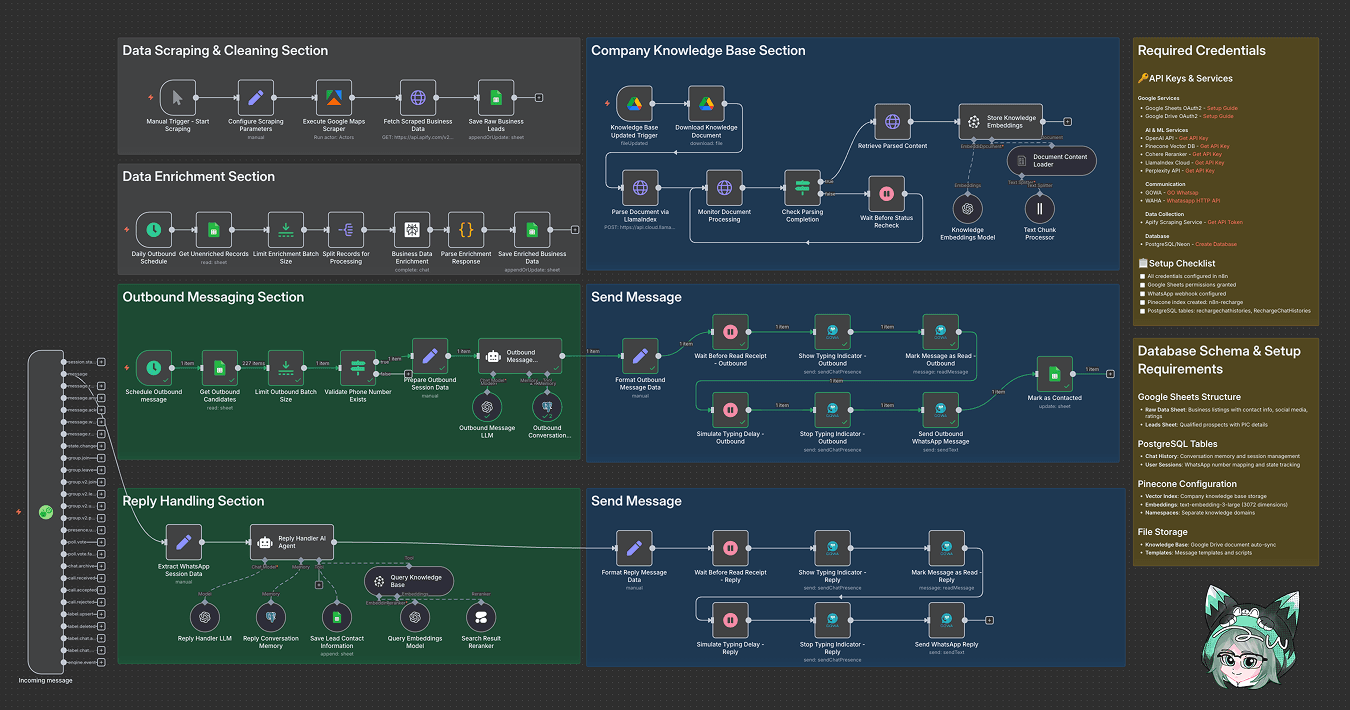
Turn local outreach into a repeatable pipeline. Automate Outreach Prospect finds, enriches, and messages potential partners (restaurants, malls, bars) using Apify Google Maps scraping, Perplexity enrichment, OpenAI LLMs, Google Sheets, Pinecone knowledge, and WhatsApp sending via GOWA. Less copy-paste, more closing deals.
Important Disclaimer
This workflow uses community nodes for WhatsApp functionality:
Last updated: September 2026.
Why Use Automate Outreach Prospect?
- Faster prospecting: Scrape up to 150 leads per search and queue them for outreach in minutes. Research that took days now takes hours.
- Fixes the busywork: Missing contact data gets enriched automatically, and messages only go to records with phone numbers. No more dead leads.
- Measurable lift: Enrichment runs in batches of 20, raising contactable leads per campaign by dozens each run.
- Better conversions with context: A searchable company knowledge base (Pinecone + LlamaIndex) lets replies be handled with context. Less robotic, more relevant.
Perfect For
- Sales Ops: Teams scaling partner outreach without hiring an army of SDRs.
- Growth Marketers: People running repeatable local outreach campaigns (mall, restaurant, bar categories).
- Small Biz Owners: A quick way to build partnership lists and automate first outreach without living in spreadsheets.
How It Works
- Trigger: Manual scrape start or scheduled jobs: Daily Outbound Schedule, Schedule Outbound message, or Knowledge Base Updated Trigger.
- Process: Apify Google Maps Scraper gathers business listings (location, phone, socials). Results land in Google Sheets (Raw Data). Unenriched records are split and enriched via Perplexity, then saved back.
- Smart Logic: OpenAI LLM writes personalized initial messages, and a Reply Handler AI Agent uses Pinecone knowledge embeddings to interpret replies and decide next actions (save PICs, request meeting, send proposal).
- Output: Outbound messages go out over WhatsApp via GOWA nodes (typing indicators, simulated delays, read receipts). Replies are handled and stored; qualified PIC contacts append to a Leads sheet.
- Storage: Google Sheets is the central datastore (Raw Data, Leads Collected). Knowledge base lives in Google Drive and Pinecone (n8n-recharge, namespace CompanyKnowledgeBased). Conversation memory sits in Postgres/Neon.
Quick Setup
-
Import Workflow: Import JSON file to your n8n instances
-
Add Credentials:
- Google Sheets OAuth2
- Google Drive OAuth2
- Apify API token
- OpenAI API
- Perplexity API
- Pinecone API (docs)
- Cohere API
- LlamaIndex Cloud key
- GOWA (WhatsApp) credentials
- WAHA webhook (optional)
- PostgreSQL/Neon
-
Customize Parameters:
- Scraping parameters (Location Category, lokasi, jumlah leads, minimum Stars, Skip Closed Place)
- Message templates/time greetings
- Enrichment batch size
-
Update Configuration:
- Google Drive doc ID
- Google Sheets ID
- Apify actor config
- Pinecone index name
- Pinecone namespaces
- LlamaIndex endpoints (if used)
-
Test Setup:
Run a manual scrape with a real location and send a single outbound message to verify WhatsApp delivery and reply handling.
Required Services
- Active n8n instances
- Google Sheets & Google Drive accounts (OAuth2)
- Apify account & actor access (Google Maps Scraper)
- OpenAI API key (for LLMs & embeddings)
- Perplexity API key (enrichment)
- Pinecone account (vector index n8n-recharge)
- Cohere API (reranker, optional)
- LlamaIndex Cloud (optional document parsing)
- GOWA / WA WhatsApp setup (or WAHA alternative)
- PostgreSQL/Neon for conversation memory
Workflow Nodes
Triggers & Scheduling
- Incoming message
- Manual Trigger - Start Scraping
- Daily Outbound Schedule
- Schedule Outbound message
- Knowledge Base Updated Trigger
Data Collection & Processing
- Configure Scraping Parameters
- Execute Google Maps Scraper
- Fetch Scraped Business Data
- Save Raw Business Leads
- Get Unenriched Records
- Limit Enrichment Batch Size
- Split Records for Processing
Data Enrichment
- Business Data Enrichment
- Parse Enrichment Response
- Save Enriched Business Data
Outbound Messaging
- Get Outbound Candidates
- Limit Outbound Batch Size
- Validate Phone Number Exists
- Prepare Outbound Session Data
- Outbound Message Generator
- Outbound Message LLM
- Format Outbound Message Data
WhatsApp Communication
- Show Typing Indicator - Outbound
- Simulate Typing Delay - Outbound
- Send Outbound WhatsApp Message
- Mark as Contacted
- Extract WhatsApp Session Data
Reply Handling
- Reply Handler AI Agent
- Reply Handler LLM
- Format Reply Message Data
- Show Typing Indicator - Reply
- Simulate Typing Delay - Reply
- Send WhatsApp Reply
- Save Lead Contact Information
Knowledge Management
- Store Knowledge Embeddings
- Query Knowledge Base
- Reply Conversation Memory
- Outbound Conversation Memory
Quick Answers
How many leads per run?
Up to 150 leads per search, enriched in batches of 20.
How are replies handled?
An AI agent reads each reply against your Pinecone knowledge base and decides: save PIC, request meeting, or send proposal.
Which WhatsApp setup does it use?
GOWA nodes by default, with WAHA as an alternative.
Made by: khmuhtadin
Need custom work? Contact Me
Additional info
Built with n8n. Need an assessment on your business? Feel free to reach out at https://khmuhtadin.com/consultation/