See llms.txt for all machine-readable content.


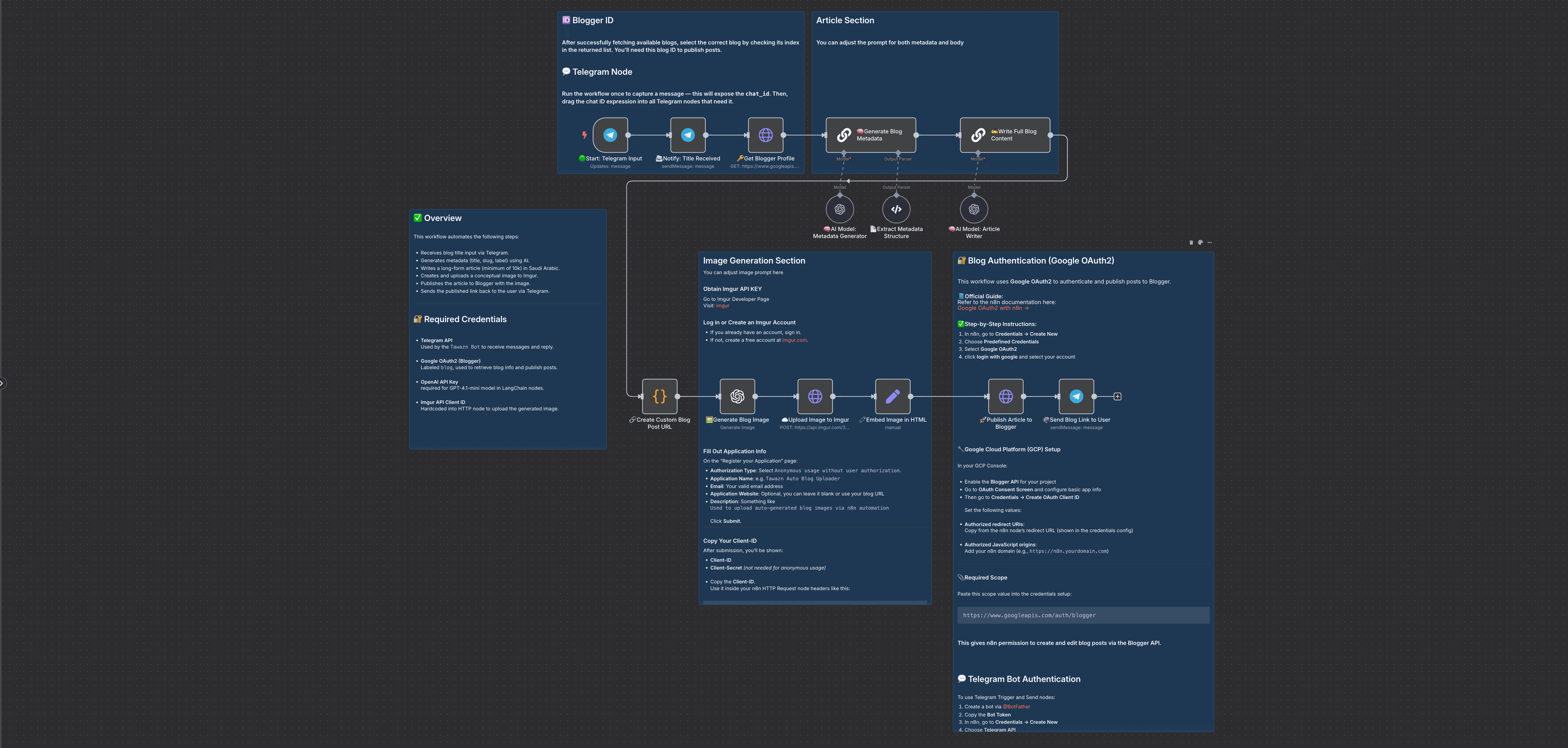
Long-form Blogger posts without the grind. This n8n workflow, BlogBlitz: Blogger Edition, automates the complete creation and publishing of 10,000+ word articles to Blogger. Send a blog title via Telegram and it handles SEO metadata, full article writing, custom images, and publishing with proper URL structure.
Last updated: September 2026.
Who is this for?
Blogger users, content creators, and digital marketers who want high-quality, SEO-optimized content without manual writing. Especially useful if you publish on Google's Blogger platform instead of WordPress.
What problem is this workflow solving?
Long-form SEO content takes serious time and expertise, and most automation tools only serve WordPress, leaving Blogger users behind. BlogBlitz: Blogger Edition automates the full Blogger pipeline, from SEO metadata and article writing to custom images and publishing with clean URL structure.
What this workflow does
- Triggers: Receives blog title input via Telegram message
- AI-Powered Content: Uses OpenAI GPT-4.1-mini to generate SEO metadata (title, slug, labels) and comprehensive articles
- Advanced Image Generation: Creates custom conceptual images using DALL-E that visually represent your article's theme
- SEO Features: Generates custom URLs with date structure, meta descriptions, and proper HTML formatting
- Reference Features: GPT-4.1 references valid, credible resources with proper citations
- Blogger Integration: Automated publishing directly to Blogger (not WordPress) with full API integration
- Image Hosting: Automatically uploads generated images to Imgur and embeds them properly
- Instant Notifications: Sends published blog link back via Telegram with mobile-optimized URLs
Setup
- n8n Instance: Ensure you have a cloud or self-hosted n8n instance
- Credentials:
- Google OAuth2: For Blogger API access with
https://www.googleapis.com/auth/bloggerscope - OpenAI API: For GPT-4.1-mini text generation and DALL-E image creation
- Telegram Bot: For receiving titles and sending notifications (tutorial)
- Imgur Client-ID: For image hosting and embedding
- Google Cloud Configuration:
- Enable Blogger API in Google Cloud Console
- Configure OAuth consent screen and create OAuth client ID
- Telegram Bot Setup:
- Create bot via @BotFather and get API token
- Test workflow to capture chat_id for notifications
- Test: Send any blog title via Telegram to generate your first automated post
How to customize this workflow to your needs
- Change Writing Style: Modify prompts for formal, casual, technical, or any specific tone
- Adjust Article Length: Change minimum word count (currently 10,000+ words) to fit your needs
- SEO Optimization: Customize keyword density and focus phrases in the writing prompts
- Image Aesthetics: Modify DALL-E prompts for different visual styles (minimalist, corporate, artistic)
- URL Structure: Edit JavaScript code to change custom URL formatting patterns
- Multi-Language: Adapt prompts for any language or regional dialect
- Content Categories: Add automatic categorization and tagging based on topics
Pre-Requirements
- n8n Instance: Cloud or self-hosted with LangChain nodes available
- API Access:
- OpenAI API key for GPT-4.1-mini and DALL-E access
- Google OAuth2 credentials with Blogger API enabled
- Telegram Bot API token
- Imgur Client-ID for anonymous image uploads
- Blogger Setup: Active Blogger blog with proper permissions
- Network: Stable internet connection for AI generation and publishing
Category: Marketing, Content Creation
Nodes Used: Telegram Trigger, LangChain LLM Chain, OpenAI (GPT-4.1-mini), OpenAI (DALL-E), HTTP Request, Google OAuth2, Blogger API, JavaScript Code
Quick Answers
How long are the articles?
10,000+ words by default. Lower the minimum word count to fit your needs.
Where do images live?
DALL-E generates them, Imgur hosts them, and they embed automatically in the post.
How do I start a post?
Send any blog title to the Telegram bot. The published link comes back to you.
Made by: khmuhtadin
Tag: blogger, blog, seo, openai, telegram
Category: Marketing, Content Creation
Need a custom? contact me on LinkedIn or Web
Additional info
Built with n8n. Need an assessment on your business? Feel free to reach out at https://khmuhtadin.com/consultation/